Please check the following documentation for the clone() method of the Object() Class in java, re question on how it compares on object equality...
http://java.sun.com/j2se/1.4.2/docs/api/java/lang/Object.html
Tuesday, 17 February 2009

Thursday, 5 February 2009
Wednesday, 4 February 2009
Rational Rose: expressing loops

Loops in interaction diagrams may be expressed using the note construct as follows:
Rational Rose and UML 2.0

The version of Rational Rose that is available through an academic licence, supports only UML 1.4 and not 2.0. Some features that we learned in the lectures belong to UML 2.0 (e.g. conditional and iterative messages and blocks of code represented with a frame). There is no direct way to express these in RR. The specification menu of a message in an interaction diagram shows all the possible types of messages that are supported:
You may use an indirect way to record the features that are not supported. For example, you may associate a note with a message in order to show t
 hat it is conditional.
Representing secondary actors in Rational Rose

As far as I know, there is no separate symbol for a secondary actor in Rational Rose, as opposed to a primary actor. You may add this information in the "Documentation" field, in the Specification menu of an actor entity in Rational Rose, as shown here:
Monday, 12 January 2009
Worksheet 1
Select Programs->IBM Rational->IBM Rational Rose Professional JEdition
The “Create New Model window” comes up. Select one of the J2SE projects, for example J2SE 1.4 and click “ok”. Wait until the program stops compiling the J2SE 1.4 libraries.
1. Follow the tutorial “Creating use-case diagram” from:
in order to create the Use Case diagram shown in lecture 2.
2. Write the “Handle Returns” use-case using the Coleman Template.
3. Write the “Process Rental” use-case using the Coleman Template.
4. For the “Repairing Cellular Networks” use-case and its sub-cases and extensions, please make a use-case diagram following the above tutorial.
Tuesday, 8 July 2008
Installation Instructions for NetBEans 6.1 UML modelling
1. Download the bundle of NEtBEans 6.1 with JDK 1.6.0_12 (if you have no JDK (Java SE Development Kit) installed already).
http://java.sun.com/javase/downloads /netbeans.html
Else, if you already have JDK installed
(you need at least JDK 1.5.0 update 12, see http://www.netbeans.org/community/releases/61/install.html#requiredsoftware )
you need to download only NetBeans 6.1.
Go to URL:
http://bits.netbeans.org/netbeans/6.1/m1/latest/
and click on "Download", the one at the right-bottom corner that is at the bottom of a column called "All".
2. Install NEtBEans according to the instractions URL:
http://www.netbeans.org/community/releases/61/install.html
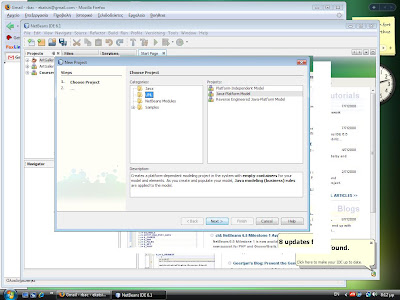 3. Start NetBeans and From the File menu chose "New Project"
The following window should appear:

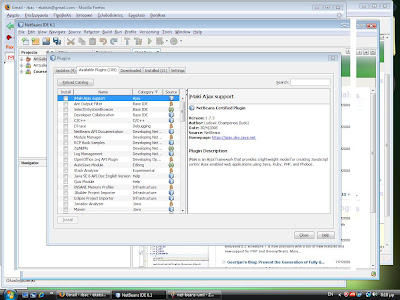
4. If there is no "UML" under categories, then you need to install the UML library separately.
Press cancel to get out of the previous window.
Click Tools->Plugins
Select the "Available Plugins" tab. Scroll down until you find the "UML" plugin.

Select it and press "Install"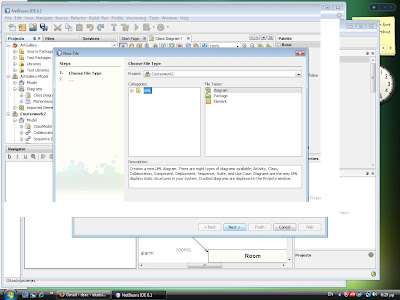
Verify that "UML" appears at the tab "Installed plugins".
5. Restart NetBEans. Select File->New Project. Under Categories, select UML. Under Projects, select "Java-platform model".
6. Select File->New File

Under "File Types", click on "Diagram". Click "Next"

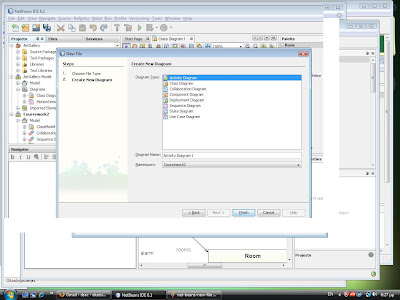
Select diagram type.
http://java.sun.com/javase
Else, if you already have JDK installed
(you need at least JDK 1.5.0 update 12, see http://www.netbeans.org
you need to download only NetBeans 6.1.
Go to URL:
http://bits.netbeans.org
and click on "Download", the one at the right-bottom corner that is at the bottom of a column called "All".
2. Install NEtBEans according to the instractions URL:
http://www.netbeans.org
 3. Start NetBeans and From the File menu chose "New Project"
The following window should appear:

4. If there is no "UML" under categories, then you need to install the UML library separately.
Press cancel to get out of the previous window.
Click Tools->Plugins
Select the "Available Plugins" tab. Scroll down until you find the "UML" plugin.
Select it and press "Install"

Verify that "UML" appears at the tab "Installed plugins".
5. Restart NetBEans. Select File->New Project. Under Categories, select UML. Under Projects, select "Java-platform model".
6. Select File->New File
Under "File Types", click on "Diagram". Click "Next"

Select diagram type.
Subscribe to:
Posts (Atom)