First, convert the Exceptional Instance (e.g. Address Error) so that the "Xi" notation is substituted by the "Delta" notation. This is achived by substituting the "Xi-S" symbol with a "Delta-S" symbol and adding the axiom s=s', where s is the state schema in question (e.g. s=store).
Create the top part (signature part) of the disjoined schema (e.g. Assign) by merging the top parts of the Normal Instance(e.g Assign OK) and the Exceptional Instance (e.g. Address Error), so that each input and output variable is declared only once.
Split the bottom (axiom part) of the disjoined schema into two parts that are conected with the disjunction operator (logical OR). In the LHS part, copy the axiom part of the Normal Instance enclosed in square brackets and on the RHS copy the RHS of the exceptional schema enclosed in brackets. DO not forget that the axiom part of this schema will have an extra axiom (e.g. store=store')
Thursday, 30 April 2009

Tuesday, 3 March 2009
Notes on Lecture 9 (full-time)
Slide 21:
"Evaluation in first-order logic"
First we write out all the possible Q predicates. Because Q={(x,y)|x=y} and x,y in {M,T,H} we get:
Q= {(Mark, Mark), (Harry, Harry), (Tom, Tom)} (1)
In our theory we are given P(a,y) (2)
and in the structure we are given a=Tom (3).
We see from the possible P pairs {(Tom, Mark), (Tom, Harry), (Mark, Harry) } (4)
that the only possible values for y from (2), (3) and (4) are:
y in {Mark,Harry} (5)
so from (4),(5) we have that:
P={(Tom,Mark),(Tom, Harry)} (6)
We need now to check whether there exists an x in {T,M,H} such that for all y in {T,M,H} Q(f(y),x) is true (our theory)
We check one by one all the allowed values of y:
For y=Mark:
Q(f(Mark), x) = Q(Harry,x)
in order for this predicate to be true, it needs to be one of the allowed predicates in (1).
The only value of x that satisfies this is x=Harry
For y=Harry
Q(f(Harry),x)=Q(Harry,x)
similarly, in order for this predicate to be true, it it needs to be one of the allowed predicates in (1).
The only value of x that satisfies this is x=Harry
Therefore, our theory, given the specific structure becomes true for x=Harry.
We say that the structure is a model for our theory.
Structure:
X={T,M,H}
a=T
P={(Tom, Mark), (Tom, Harry), (Mark, Harry) }
Q=Q={(x,y)|x=y}
f(T)=m,f(M)=f(H)=H
"Evaluation in first-order logic"
First we write out all the possible Q predicates. Because Q={(x,y)|x=y} and x,y in {M,T,H} we get:
Q= {(Mark, Mark), (Harry, Harry), (Tom, Tom)} (1)
In our theory we are given P(a,y) (2)
and in the structure we are given a=Tom (3).
We see from the possible P pairs {(Tom, Mark), (Tom, Harry), (Mark, Harry) } (4)
that the only possible values for y from (2), (3) and (4) are:
y in {Mark,Harry} (5)
so from (4),(5) we have that:
P={(Tom,Mark),(Tom, Harry)} (6)
We need now to check whether there exists an x in {T,M,H} such that for all y in {T,M,H} Q(f(y),x) is true (our theory)
We check one by one all the allowed values of y:
For y=Mark:
Q(f(Mark), x) = Q(Harry,x)
in order for this predicate to be true, it needs to be one of the allowed predicates in (1).
The only value of x that satisfies this is x=Harry
For y=Harry
Q(f(Harry),x)=Q(Harry,x)
similarly, in order for this predicate to be true, it it needs to be one of the allowed predicates in (1).
The only value of x that satisfies this is x=Harry
Therefore, our theory, given the specific structure becomes true for x=Harry.
We say that the structure is a model for our theory.
Structure:
X={T,M,H}
a=T
P={(Tom, Mark), (Tom, Harry), (Mark, Harry) }
Q=Q={(x,y)|x=y}
f(T)=m,f(M)=f(H)=H
Monday, 23 February 2009
Notes on Lecture 7 : synchronized methods
The following notes are extracts from the Sun Java specification document. They are provided here as supplementary notes to the Singleton pattern that uses a synchronized method for ensuring that there is only a single instance of the Singleton object.
"The Java programming language provides multiple mechanisms for communicating between threads. The most basic of these methods is synchronization, which is implemented using monitors. Each object in Java is associated with a monitor, which a thread can lock or unlock. Only one thread at a time may hold a lock on a monitor. Any other threads attempting to lock that monitor are blocked until they can obtain a lock on that monitor. A thread t may lock a particular monitor multiple times; each unlock reverses the effect of one lock operation.
A synchronized method automatically performs a lock action when it is invoked; its body is not executed until the lock action has successfully completed. If the method is an instance method, it locks the monitor associated with the instance for which it was invoked (that is, the object that will be known as this during execution of the body of the method). If the method is static, it locks the monitor associated with the Class object that represents the class in which the method is defined. If execution of the method's body is ever completed, either normally or abruptly, an unlock action is automatically performed on that same monitor. "
http://java.sun.com/docs/books/jls/third_edition/html/memory.html#56318
"The Java programming language provides multiple mechanisms for communicating between threads. The most basic of these methods is synchronization, which is implemented using monitors. Each object in Java is associated with a monitor, which a thread can lock or unlock. Only one thread at a time may hold a lock on a monitor. Any other threads attempting to lock that monitor are blocked until they can obtain a lock on that monitor. A thread t may lock a particular monitor multiple times; each unlock reverses the effect of one lock operation.
A synchronized method automatically performs a lock action when it is invoked; its body is not executed until the lock action has successfully completed. If the method is an instance method, it locks the monitor associated with the instance for which it was invoked (that is, the object that will be known as this during execution of the body of the method). If the method is static, it locks the monitor associated with the Class object that represents the class in which the method is defined. If execution of the method's body is ever completed, either normally or abruptly, an unlock action is automatically performed on that same monitor. "
http://java.sun.com/docs/books/jls/third_edition/html/memory.html#56318
Notes on Lecture 7 : Singleton Pattern
On the Singleton implementation shown below, there was a question on why the getSpooler() method does not seem to have a return value in the signature, although the singleton instance _spooler is returned at the end of the method implementation:
That was a typo and I have corrected it. The return type in the signature should be PrintSpooler.
There was also a question relating to declaring the constructor as "private" and whether we may have multiple constructors and whether they would all be private. We make the constructor private so an instance can only be created from within the static method of the class. Since we are only interested in having a single instance of PrintSpooler, it is rather unlikely that we would need the flexibility of having more than one constructors. Most likely we are able to define our one instance exactly and assign a single constructor to it. Certainly, the classic version of Singleton has one constructor. However, if we did have more than one constructor, they would all need to be declared "private" for the same reason.
That was a typo and I have corrected it. The return type in the signature should be PrintSpooler.
There was also a question relating to declaring the constructor as "private" and whether we may have multiple constructors and whether they would all be private. We make the constructor private so an instance can only be created from within the static method of the class. Since we are only interested in having a single instance of PrintSpooler, it is rather unlikely that we would need the flexibility of having more than one constructors. Most likely we are able to define our one instance exactly and assign a single constructor to it. Certainly, the classic version of Singleton has one constructor. However, if we did have more than one constructor, they would all need to be declared "private" for the same reason.
Public class PrintSpooler {
// a prototype for a spooler class,
// such that only one instance can ever exist
private static PrintSpooler _spooler;
private PrintSpooler()
{ /* private constructor */ }
public static synchronized PrintSpooler
getSpooler() {
if (_spooler == null) _spooler = new
PrintSpooler();
return _spooler;
}
}Rational Rose: system actors

To distinguish between a human actor and a system actor, you may use an Actor Decoration instead of an Actor Icon.
Tuesday, 17 February 2009
clone() in Java
Please check the following documentation for the clone() method of the Object() Class in java, re question on how it compares on object equality...
http://java.sun.com/j2se/1.4.2/docs/api/java/lang/Object.html
http://java.sun.com/j2se/1.4.2/docs/api/java/lang/Object.html
Thursday, 5 February 2009
Wednesday, 4 February 2009
Rational Rose: expressing loops

Loops in interaction diagrams may be expressed using the note construct as follows:
Rational Rose and UML 2.0

The version of Rational Rose that is available through an academic licence, supports only UML 1.4 and not 2.0. Some features that we learned in the lectures belong to UML 2.0 (e.g. conditional and iterative messages and blocks of code represented with a frame). There is no direct way to express these in RR. The specification menu of a message in an interaction diagram shows all the possible types of messages that are supported:
You may use an indirect way to record the features that are not supported. For example, you may associate a note with a message in order to show t
 hat it is conditional.
Representing secondary actors in Rational Rose

As far as I know, there is no separate symbol for a secondary actor in Rational Rose, as opposed to a primary actor. You may add this information in the "Documentation" field, in the Specification menu of an actor entity in Rational Rose, as shown here:
Monday, 12 January 2009
Worksheet 1
Select Programs->IBM Rational->IBM Rational Rose Professional JEdition
The “Create New Model window” comes up. Select one of the J2SE projects, for example J2SE 1.4 and click “ok”. Wait until the program stops compiling the J2SE 1.4 libraries.
1. Follow the tutorial “Creating use-case diagram” from:
in order to create the Use Case diagram shown in lecture 2.
2. Write the “Handle Returns” use-case using the Coleman Template.
3. Write the “Process Rental” use-case using the Coleman Template.
4. For the “Repairing Cellular Networks” use-case and its sub-cases and extensions, please make a use-case diagram following the above tutorial.
Tuesday, 8 July 2008
Installation Instructions for NetBEans 6.1 UML modelling
1. Download the bundle of NEtBEans 6.1 with JDK 1.6.0_12 (if you have no JDK (Java SE Development Kit) installed already).
http://java.sun.com/javase/downloads /netbeans.html
Else, if you already have JDK installed
(you need at least JDK 1.5.0 update 12, see http://www.netbeans.org/community/releases/61/install.html#requiredsoftware )
you need to download only NetBeans 6.1.
Go to URL:
http://bits.netbeans.org/netbeans/6.1/m1/latest/
and click on "Download", the one at the right-bottom corner that is at the bottom of a column called "All".
2. Install NEtBEans according to the instractions URL:
http://www.netbeans.org/community/releases/61/install.html
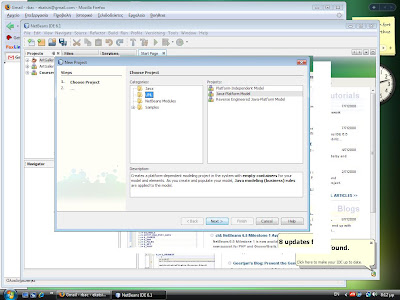 3. Start NetBeans and From the File menu chose "New Project"
The following window should appear:

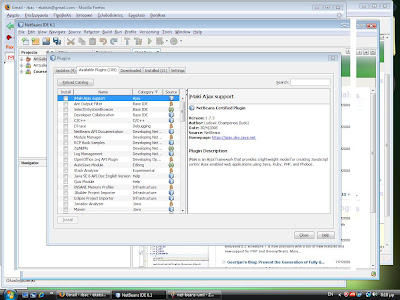
4. If there is no "UML" under categories, then you need to install the UML library separately.
Press cancel to get out of the previous window.
Click Tools->Plugins
Select the "Available Plugins" tab. Scroll down until you find the "UML" plugin.

Select it and press "Install"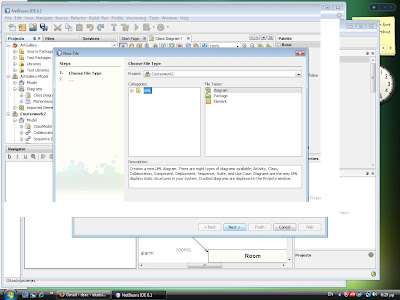
Verify that "UML" appears at the tab "Installed plugins".
5. Restart NetBEans. Select File->New Project. Under Categories, select UML. Under Projects, select "Java-platform model".
6. Select File->New File

Under "File Types", click on "Diagram". Click "Next"

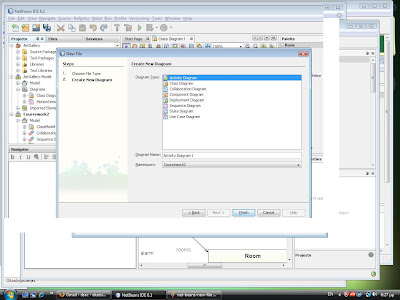
Select diagram type.
http://java.sun.com/javase
Else, if you already have JDK installed
(you need at least JDK 1.5.0 update 12, see http://www.netbeans.org
you need to download only NetBeans 6.1.
Go to URL:
http://bits.netbeans.org
and click on "Download", the one at the right-bottom corner that is at the bottom of a column called "All".
2. Install NEtBEans according to the instractions URL:
http://www.netbeans.org
 3. Start NetBeans and From the File menu chose "New Project"
The following window should appear:

4. If there is no "UML" under categories, then you need to install the UML library separately.
Press cancel to get out of the previous window.
Click Tools->Plugins
Select the "Available Plugins" tab. Scroll down until you find the "UML" plugin.
Select it and press "Install"

Verify that "UML" appears at the tab "Installed plugins".
5. Restart NetBEans. Select File->New Project. Under Categories, select UML. Under Projects, select "Java-platform model".
6. Select File->New File
Under "File Types", click on "Diagram". Click "Next"

Select diagram type.
Monday, 12 May 2008
Coursework 2 -3 model answers available!
at:
http://www.dcs.bbk.ac.uk/%7Eeli/coursework.html
many thanks,
http://www.dcs.bbk.ac.uk/%7Eeli/coursework.html
many thanks,
Thursday, 3 April 2008
Installation instructions for Rational Rose
In order to install Raional Rose on your personal PC, do the following:
To start using the application go to Start->Programs->IBM Rational->IBM Rational Rose Professional J Edition. A panel that contains a selection of projects comes up as shown below. Select J2SE 1.4 to create a new java project.
- Go to the provided link:
- http://vili.dcs.bbk.ac.uk/intranet/r/scripts/rose/
- Log in with your school account.
- Fill in the requested details.
- A page comes up that contains three downloadable files, C90HGM(Java)L.zip, C90HHM(VisBasic)L.zip, C90IOML(C++).zip. Select the archive of interest, e.g. C90HGM(Java)L.zip and save it locally to a directory called RationalRose (e.g. C:\RationalRose)
- Wait until Phil (systems group) provides you with a licence.
- Open Phil's email, select the text that
 refers to the licence (between the two lines "Cut Here") and copy paste this into a text file and rename this to rose_licence.txt. Save the txt file locally to your RationalRose directory.
 - Extract the archive that you have downloaded locally using a free version of WinRAR.
- Click on the setup.exe file that is extracted in the root directory of RationalRose (or one level down from the root).
- The "IBM Rational Rose Professional J. Edition Launch Pad" comes up. Select "Install IBM Rational Rose Prof. J Edition".
- Under Deployment method, select "Desktop Installation from CD image".
- Accept Terms&Conditions.
- Accept default options.
- At the end of the installation, read the "How to obtain release notes" page that pops up and close it.
- When the "Licence Key Administrator Wizard" pops up, select the option "Import a Rational Licence file" and upload the file rose_licence.txt.
- Accept the next default options.
- The software has been installed successfully.
- Do the same for other version that you may need, e.g. the C++ one.

To start using the application go to Start->Programs->IBM Rational->IBM Rational Rose Professional J Edition. A panel that contains a selection of projects comes up as shown below. Select J2SE 1.4 to create a new java project.
Tuesday, 18 March 2008
Solution to Coursework 1 available on the web-site!
You can download model answers to coursework 1:
http://www.dcs.bbk.ac.uk/%7Eeli/lectures.html
(Lecture 10).
http://www.dcs.bbk.ac.uk/%7Eeli/lectures.html
(Lecture 10).
Student Licences for Rational Rose released!
Students can now download Rose and get a license file from us at the
following page:
http://vili.dcs.bbk.ac.uk/intranet/r/scripts/rose/
Unfortunately, the download and install, plus license file acquisition
are a non-trivial exercise.
following page:
http://vili.dcs.bbk.ac.uk/intranet/r/scripts/rose/
Unfortunately, the download and install, plus license file acquisition
are a non-trivial exercise.
Wednesday, 5 March 2008
Official coursework on OOA/OOD published!
http://www.dcs.bbk.ac.uk/%7Eeli/coursework.html
Select :
"Coursework 2007-2008"
Eli
Select :
"Coursework 2007-2008"
Eli
Rational Rose software
Dear all,
we have introduced a modelling tool called Rational Rose and it is installed in lab 131. You are wellcome to try it out. It is a state-of-the-art open-source software for OOA/OOD. We are working on a demonstration and for getting licences that you can use at home.
Eli
we have introduced a modelling tool called Rational Rose and it is installed in lab 131. You are wellcome to try it out. It is a state-of-the-art open-source software for OOA/OOD. We are working on a demonstration and for getting licences that you can use at home.
Eli
Exercise 1 : Student Registration
Dear all,
the solutions of the tutorials, "Student Registration" and "Video Rental", are available at the course's home page (lectures 5 & 6).
http://www.dcs.bbk.ac.uk/~eli/lectures.html.
Kind regards,
Eli
the solutions of the tutorials, "Student Registration" and "Video Rental", are available at the course's home page (lectures 5 & 6).
http://www.dcs.bbk.ac.uk/~eli/lectures.html.
Kind regards,
Eli
Subscribe to:
Posts (Atom)